
Anagrams are a fascinating form of wordplay where the letters of a word or phrase are rearranged to create a new meaning without adding or removing any letters. While they may seem like simple puzzles at first, anagrams combine logic, creativity, and language awareness in a powerful way. From classic literary examples to modern word games like Scrabble and crossword puzzles, anagrams are both entertaining and educational. Today, tools like an anagram text generator make it even easier to explore new word combinations by instantly rearranging letters into meaningful words and phrases. With the help of anagram generators and advanced word finder tools, anyone can discover hidden word patterns, improve vocabulary, and sharpen problem-solving skills. This guide explains how anagrams work, how an anagram text generator creates valid permutations, and how you can use it effectively in games, learning, and even creative identity building.
Advanced Anagram Generator
5 charactersPossible Results
Understanding Anagrams in a Practical Way
An anagram is formed by rearranging the letters of an original word to produce a new phrase or set of words while the original letters are retained. The key rule is simple: nothing is added and nothing is removed; only the order changes through careful rearrangement or permutation. For example, the original term “bad credit” can become “debits card” — same letters, but an entirely different meaning and result. I often explain this in the classroom by showing how a small shift in structure can create something surprisingly relevant and clever. It becomes a fun challenge for students to see how one phrase can be reordered into something unexpected without breaking the rule.Famous anagrams make this idea even more interesting. In Harry Potter, the full name “Tom Marvolo Riddle” is rearranged into Lord Voldemort, revealing the character’s secret through his birth name. Another playful example is “nine thumps,” which can transform through simple rearranging into something meaningful. Historically, even a strict schoolmaster might have used word puzzles as light mental punishments, turning learning into subtle games. From my experience, once people see how an original word can shift into clever phrases through controlled rearrangement, they start spotting anagrams everywhere — not just as wordplay, but as a creative way to look at language
How Does an Anagram Generator Work?
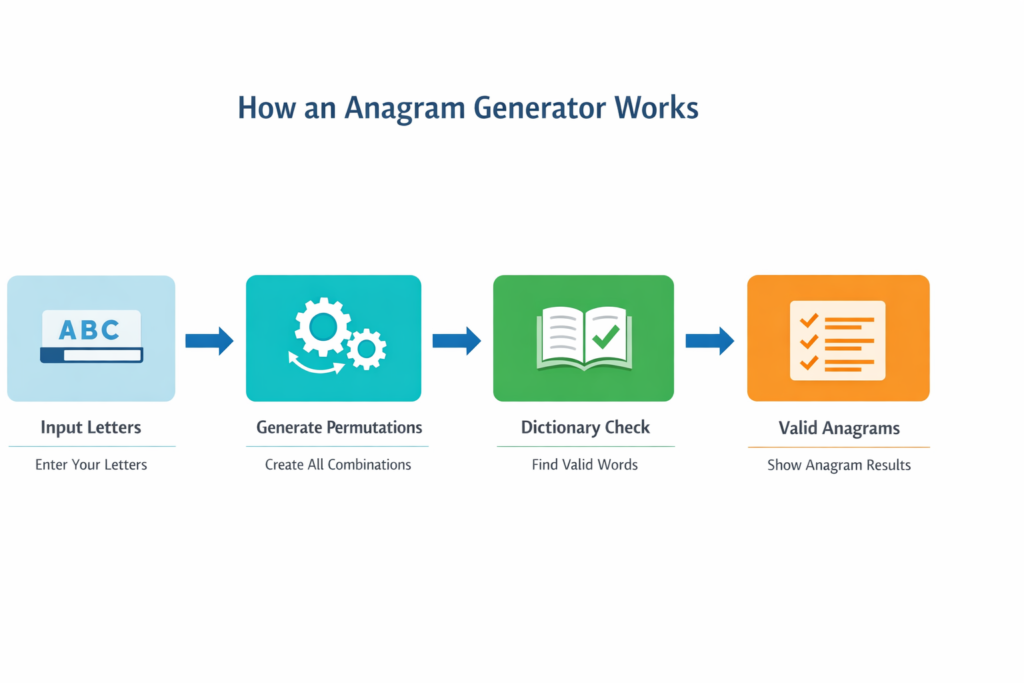
An anagram generator is a smart software tool that takes your letters or words and creates valid anagrams by checking every possible permutations against a dictionary or word list. Instead of random disorder, it carefully identifies which combinations truly exist in the English language and then return relevant and reasonable results in a fast way.
Steps
- The user enters a query by typing a word like DCODE or a group of letters.
- The generator begins anagramming by creating all possible permutations from the given letters.
- It compares each mix with a pre-existing dictionary or word list to identify valid matches such as ME, ONCE, CANE, MADDED, or MODDED.
- The tool allows selecting filters like minimum word length, number of words, or showing only common instead of less common terms.
- If there is no result, the system may guide the user by limiting the list, asking to delete a letter, or adjust limits to increase possible matches.
- In word games like Scrabble and Words with Friends, players can plug their tiles from the rack or imagine letters from the Scrabble bag to find the longest word with the highest points.
- On the board, smart placement around open spaces can improve strategy, help choose the best move, and gain an early advantage in the initial play.
- Many seasoned players use it as a word finder, word anagram aid, or even a device to solve a jumble — not just to cheat, but to sharpen skills and win against a strong opponent in a fast-paced complete game.
Using the Anagram Text Generator
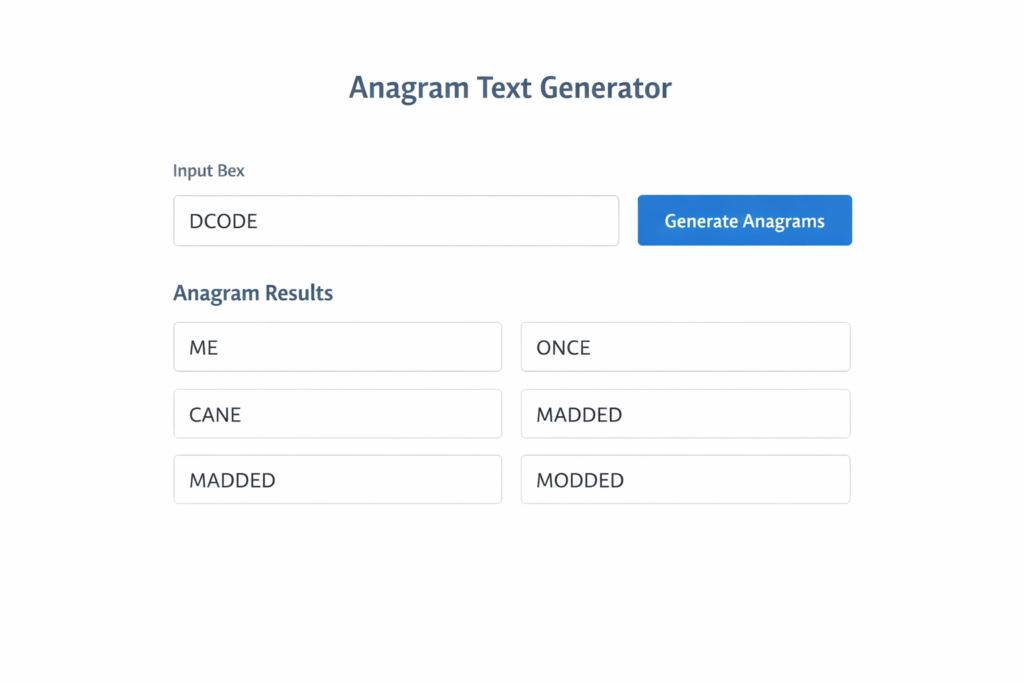
An anagram generator helps the user turn text that is entered into valid anagrams by testing permutations of letters and checking them in a dictionary or Wordlist Database. Good software avoids random disorder, identifies potential matches, and can return fast, relevant, and reasonable results—or show no result if no anagrams exist under your chosen limits.
Steps
- Open the generator and click the input box / input field.
- Type your text using characters and letters (your query) and press Enter.
- The tool makes an array of scrambled options (many permutations) and checks them in a dictionary / word list.
- Review the results: anagrams can be sorted alphabetically or by score.
- If you want tighter control, open Advanced Settings and set word count, minimum word length, and Word Length.
- Choose the right dictionary mode: Scrabble US, Scrabble UK, SOWPODS, Scrabble Combined, All Words, Word Chums, or Wordscapes (good for different games).
- Use scoring filters: Scrabble Points, WWF points, and target the highest points / points to aim for the best score.
- Add or remove letters: use Extra Letters, or delete / replace particular letters to increase potential anagrams.
- Set placement rules: indicate a letter position (beginning or end) and require words that contain specific letters.
- If the output feels too broad, try limiting the list to more common words (or allow less common words for more solutions).
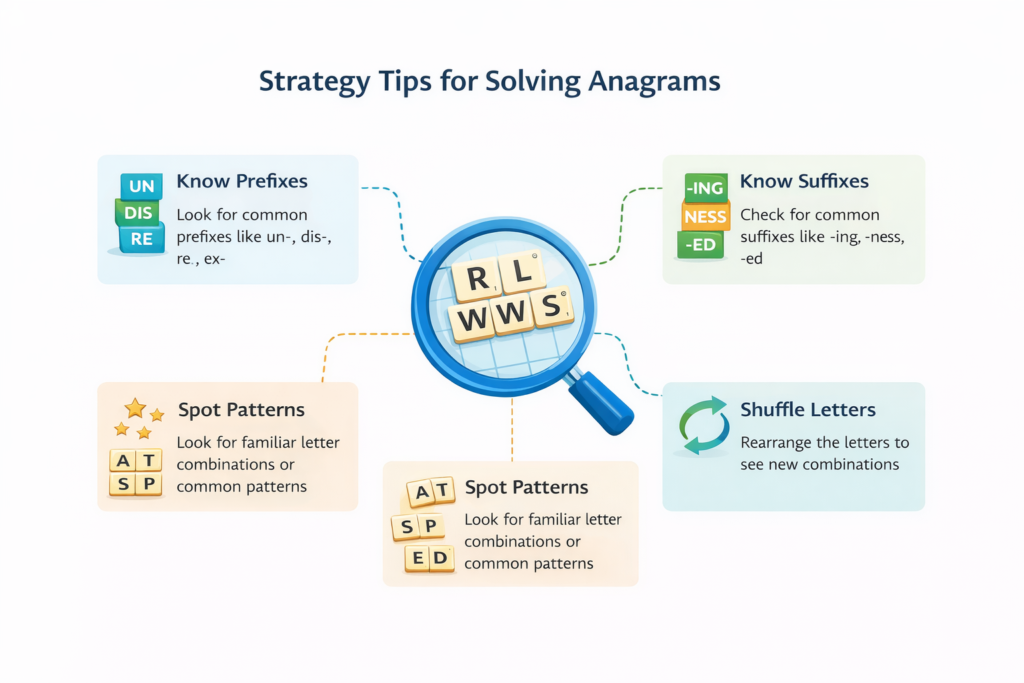
- For pattern help, recognize prefixes like ab, ad, dis, de, ex, re, sub, un and suffixes like ed, er, ing, ism, ly, ment, ness, tion.
- For examples, test DCODE and see possible anagrams like ME, ONCE, CANE, MADDED, MODDED depending on settings.
- If you need strict rules, ensure the tool USES all LETTERS ONCE (or allow letters used twice if needed).
- For short outputs, include small words like THE, A, MY, OF when allowed by your criteria.
- If you need EVERY match, relax filters and expand the word list so the tool can find more words, phrases, and new words.
- For word games like Scrabble and Words with Friends, plug in your tiles from the rack (and think about the Scrabble bag) to plan a strong strategy.
- On the board, look for open spaces and pick a strong move in the initial play to gain advantage.
- Use it as an invaluable word finder / word anagram aid or anagram maker to help seasoned players win in a fast-paced game—some call it a device or even a cheat, but it’s mainly for smart practice.
Advanced Features and Options
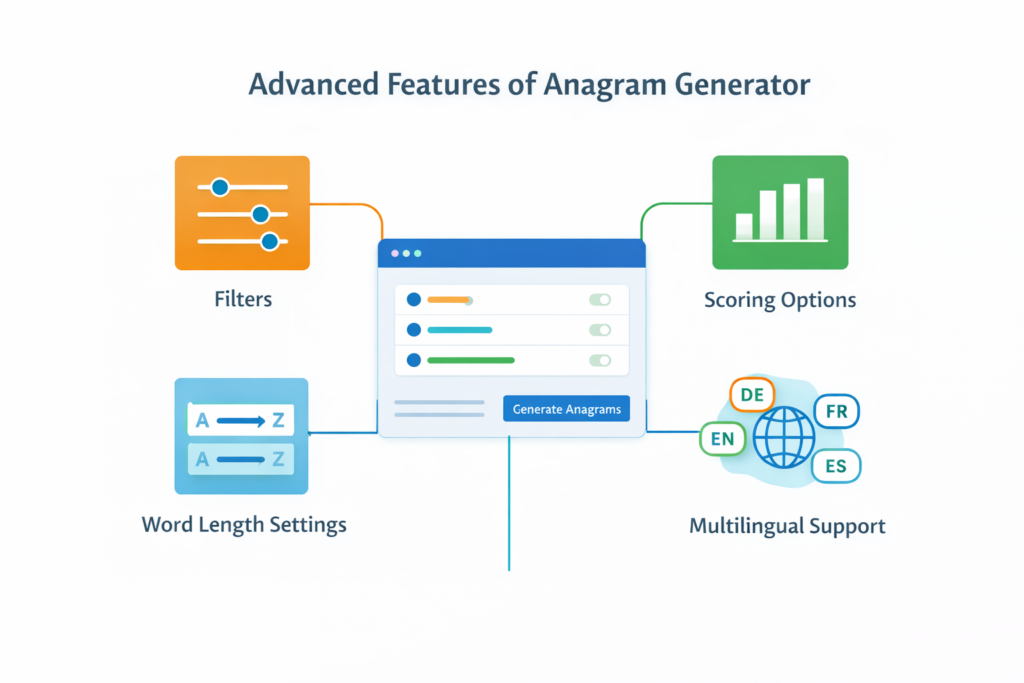
An Anagram Solver and Word Finder become much more useful when you use advanced controls. With Natural Language Processing (NLP), better Anagram Generator Accuracy, and higher Output Precision, you can fine-tune results through Advanced Settings using clear Customization Options inside a smooth Web Interface and User Interface (UI).
Steps
- Open the tool’s Web Interface and check the User Interface (UI) for Customization Options.
- Turn on Advanced Settings to access deeper Configuration Settings and save your User Preferences.
- Use Advanced Filters and Filter Options to narrow the output and get Tailored Solutions.
- Adjust Customization Controls and other Adjustable Features for stronger Personalization.
- Apply Word Length Customization to control result size and improve Custom Output.
- Use the Word Customizer or Customizable Word Generator to refine how words are built.
- If you’re solving a Word Scramble or Word Puzzle, focus on Letter Rearrangement tools and try the Word Search Tool view.
- For combining inputs, use a Word Combiner feature to test merged strings and patterns.
- Use the Vocabulary Builder mode (if available) to learn new valid words while solving.
- For Scrabble, switch to a scoring-friendly mode (if present) so the Word Finder gives playable results.
- Enable Multi-language Support if you need more than English.
- Try a Multilingual Anagram Solver when you want results in multiple languages.
- Use a Cross-language Anagram Solver or Cross-lingual Word Solver to solve mixed-language inputs.
- Turn on Language Translation Integration for smoother results across languages.
- If you’re working in French, Spanish, or German, select that language to improve accuracy.
- For broad coverage, enable International Language Support if the tool offers it.
- For tricky foreign puzzles, use the Foreign Language Puzzle Solver option when available.
- Keep expectations realistic: tools have Tool Constraints and Word Generator Limitations.
- Watch for Word List Limitations, because the database size affects what words can appear.
- If results feel slow, it may be due to Search Speed Limitations and overall Algorithm Efficiency.
- If outputs look incomplete, the cause can be Word Complexity Challenges (rare patterns and dense combinations).
Practical Uses in Everyday Word Play

Beyond simple word fun, an Anagram Solver and Word Finder have strong value in real life, especially in Word Games like Scrabble, Words with Friends, and even a Crossword Puzzle. When working with limited Letter Tiles or a small Tiles Set, players use a smart Word Generator to test different Permutations and smart Letter Combinations. On real Game Boards, success often depends on understanding Word Length, spotting hidden Word Patterns, and checking Word Validity through a trusted Dictionary or official Scrabble Dictionary. I have seen how tracking Letter Frequency and building a personal Word Bank improves Scrabble Score, especially when combined with better Game Strategies. Even solving tricky Crossword Clues becomes easier when you understand Word Construction and access a rich Lexicon or structured Word List.
Outside games, these tools support Vocabulary Expansion and deeper language learning. A strong Lexical Database powered by NLP Algorithms can suggest related Synonyms, analyze Word Meaning, and even use Phonetic Matching to find close-sounding matches. Whether in competitive Game Mode or for study, the classic Anagram becomes more than letter play—it becomes a system for exploring structure, logic, and creative thinking within language itself.
Anagram Solver Tips for Word Games Players
An Anagram Solver approach can make solving anagrams feel easier in word games when you use the right information and make good use of tools like a Word Unscrambler or Phrase Unscrambler. With a few habits, even new players can quickly spot patterns in letters, handle difficult mixes, and pinpoint better anagrams when they feel stuck.
Steps
- Collect all information from the board and other participants before you try solving.
- Put your letters into a Word Unscrambler and start with short words first.
- Use wildcards if you have unknown tiles to increase possible anagrams.
- Turn on an advanced filter to reduce noise and focus on useful words.
- Narrow your inquiries by setting a particular letter that must start or end the word.
- If you’re unsure, pause and listen to how the letters might sound as a real word.
- Practice quick sets: EILNTS → silent and AESV → vase to train pattern recognition.
- When you get stuck, change one or two letters at a time instead of changing everything.
- If the target is a longer phrase, switch to a Phrase Unscrambler and study the full phrase carefully.
- Break long phrases into smaller parts, then make something new by combining the best outputs.
- Always check meaning so you don’t pick a “valid” output that doesn’t fit the clue or situation.
- When you find a strong option, save it and compare with other anagrams to choose the best play.
- Review what worked after the round—these are your final tips for faster improvement.
Modern Uses & Features
Modern tools often go beyond word play and include privacy-focused options like an Anonymous Name Generator or Alias Name Generator. These features support Pseudonym Creation, safe branding, and creative identity building while acting as a Privacy Protection Tool for stronger Online Identity Protection.
Steps
- Open the platform and choose the Random Name Generator or Secure Name Generator option.
- Use the Name Customization Tool to adjust style and format for better Digital Persona Creation.
- If privacy is your goal, enable the Privacy-Preserving Name Generator settings.
- For stronger masking, activate the Masked Identity Tool or Identity Concealment Tool.
- Generate a profile using the Fake Identity Generator or Fictitious Name Generator.
- If needed, expand it with a Virtual Identity Generator for full Virtual Name Creation.
- Add controlled details through Fake Personal Information only when required.
- Use Anonymity Software to support secure False Identity Creation.
- Refine your profile with an Online Alias using the Alias Name Generator.
- Finalize everything through Pseudonymous Identity Generation inside the Anonymous Identity Builder.
- For sensitive use, rely on the Confidential Identity Generator to maintain protection.
- Complete the process as part of structured Fake Identity Creation with privacy in mind.
Used wisely, these tools combine creativity with safety, helping users build controlled identities without risking personal exposure.
Final Words
Anagrams prove that language is more flexible and creative than it first appears. By simply rearranging letters, we unlock new meanings, hidden patterns, and surprising connections between words. Whether used for word games, vocabulary building, creative thinking, or even identity generation, anagram tools transform simple letter mixes into powerful linguistic possibilities. With practice and the right strategies, anyone can master the art of rearrangement and discover how a small shift in structure can produce something entirely new. In the end, anagrams are not just about words—they are about perspective, logic, and creativity working together.
Frequently Asked Question
How to Generate All Permutations of Letters?
To generate all permutations of letters, list every possible arrangement of the given letters without adding or removing any. Since the number of combinations grows very fast, it’s easier to use an online anagram generator or permutation tool. These tools automatically create all possible letter orders and show which ones form real words.
What are Famous Anagrams?
Famous anagrams are well-known words or names that can be rearranged to create a surprising new meaning using the same letters.
One popular example is “Tom Marvolo Riddle” → “I am Lord Voldemort” from Harry Potter. Another classic one is “Listen” → “Silent.” You may also see “Dormitory” → “Dirty room” and “School master” → “The classroom.” These examples show how the same letters can form a completely different phrase with a clever twist.
How do you figure out your anagram?
To figure out your anagram, first write down the full word or phrase clearly. Then break it into individual letters and start rearranging them in different orders without adding or removing any letters. Try spotting small words inside the mix and build from there.
If it feels difficult, use an online anagram generator to test all possible combinations quickly. It will show you valid words made from the same letters, helping you discover creative or meaningful results faster.
How to make anagrams of words?
To make anagrams of words, start by writing the word clearly and listing all its letters. Then rearrange those letters into new combinations without adding or removing any. Try forming small words first, then build bigger ones from the remaining letters.
If you want faster results, use an online anagram generator. It automatically rearranges the letters and shows valid words you might not notice on your own.
What are some fun anagram examples?
Here are some fun anagram examples where the same letters create a surprising new meaning:
Listen → Silent
Dormitory → Dirty room
School master → The classroom
Astronomer → Moon starer
Conversation → Voices rant on
Each example uses exactly the same letters but rearranges them to form a clever or funny new phrase.